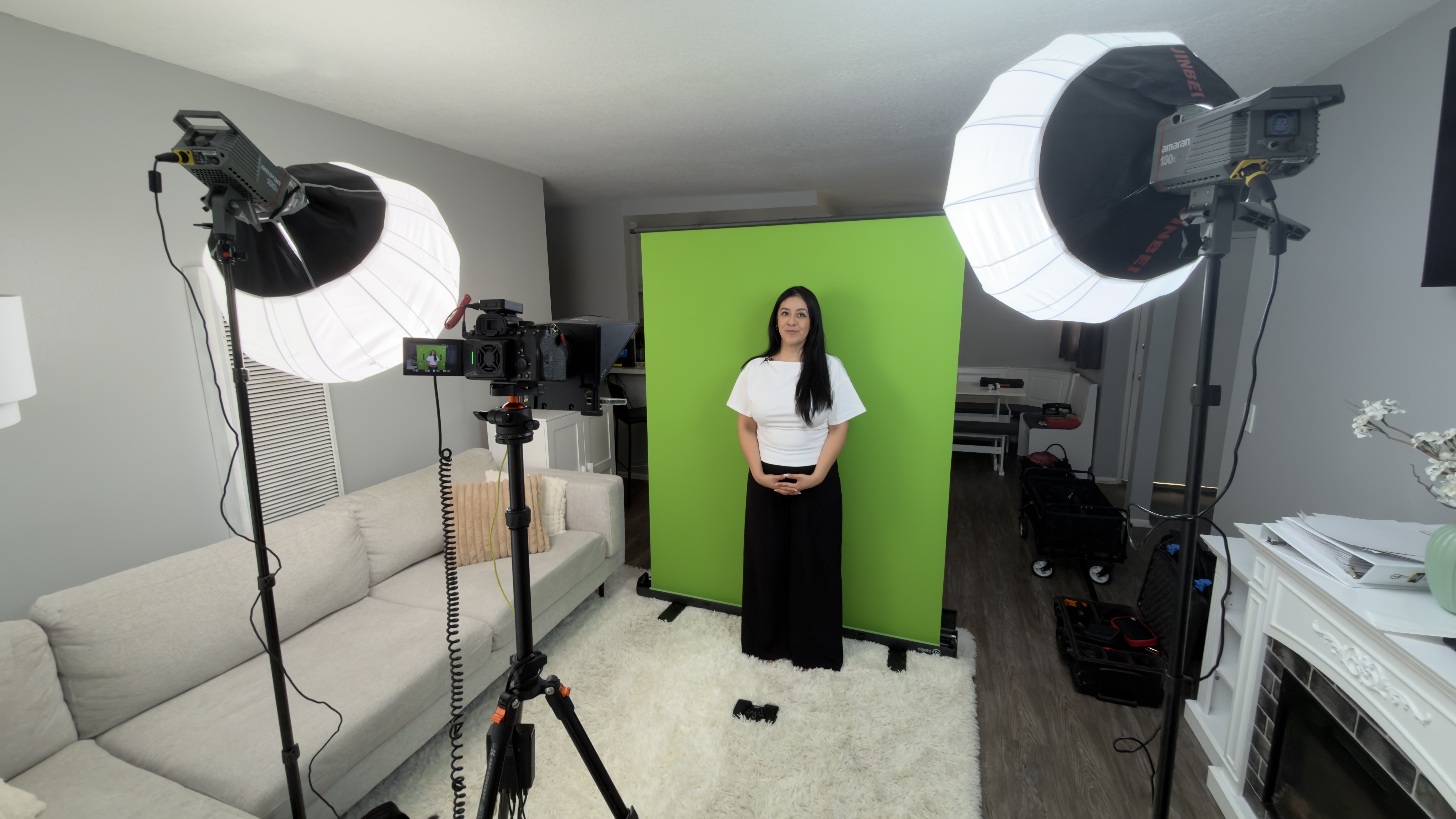
Twelve videos a month, shot on a green screen, in a client's living room. That's the setup I want to walk through, because the gear list is shorter and cheaper than most people expect, and the workflow is what actually makes the volume possible.
The client is IntelliG by Rebecca. We produce a monthly batch of videos where Rebecca teaches students and parents the foundations of reading and mathematics. Green screen, so the background can be replaced with animation and graphics, which is what keeps an educational video watchable instead of feeling like a lecture.
Starting with an empty room
The room starts as a living room. Rug, couch, window light on the far wall. The first move is stands and lights before anything else goes up: position the lights, then build the background to fit them, not the other way around.
Softboxes go on next. These are lantern-style modifiers, which throw soft light in every direction, useful in a small room because the walls and ceiling bounce it back and fill in the shadows for free.
Two lights, two jobs
The setup runs on two lights. One does beauty duty on Rebecca: soft, flattering, positioned to open up the face. The other lights the green screen itself.
That second light is the one people skip, and it's why their keys look bad. A green screen has to be lit evenly and separately from your subject. Hot spots and shadows on the fabric are what produce those crunchy, haloed edges when you pull the key. Light the screen as its own job and the background drops out cleanly in post.
The teleprompter is the real time-saver
A teleprompter is what turns a full day of shooting into a couple of hours. No memorizing, no twelve takes per segment, no editing around stumbles.
It only works if the talent can actually read well on camera, and that's the honest caveat: plenty of people go stiff the second they're reading. Rebecca doesn't. She has a strong voice and natural cadence, so she keeps pace with the scroll and it still sounds like she's talking to you rather than reciting. When you have that, the prompter is a multiplier. When you don't, you're better off with bullet points and letting the person riff.
The full gear list
- Lights: Amaran 100x, two of them, one keying the subject, one on the background.
- Modifiers: A Jinbei lantern softbox on one, a Neewer softbox on the other. They don't have to match.
- Background: Elgato collapsible green screen. Pull-up design, sets in seconds, packs flat.
- Light stands: SmallRig light stands, roughly $40–50 each.
- Tripod: K&F Concept, around $50. Mine has lasted years of location work.
- Audio: Rode Wireless PRO lavalier.
- Teleprompter: Mounted to the camera, in front of the lens.
- Cooling: Llano mini fans clipped to the camera to keep it from overheating during long batch sessions.
Some links above are affiliate links. If you buy through them I may earn a small commission at no extra cost to you. I only link gear I actually use on set.
Nothing here is exotic. The collapsible screen and the $50 stands are what make it portable enough to set up in someone's living room and strike it the same afternoon.
Why this setup earns its keep
The point of shooting on green isn't the green. It's that one recording session becomes a dozen visually distinct videos once you drop in animation and graphics behind her. Same shoot day, twelve different-looking pieces of content.
For a business producing educational content on a schedule, that ratio is everything. You're not booking a shoot per video. You're booking one shoot a month and building the visual variety in post, where it's cheap, repeatable, and doesn't require getting everybody in a room again.